Motion Control Development Guide
This document provides motion control development instructions for the Elf3 robot.
Project repository (please read the README carefully): bxi_rl_controller_ros2_example
The bxi_ws folder in the robot controller's root directory contains the motion control program.
Launching the Robot Program
Auto-Start Logic
After the robot controller powers on, the systemd service ros_elf_launch.service automatically starts the robot program. The startup chain has two stages:
- Auto-start service:
ros_elf_launch.serviceis the boot entry point, responsible for starting the remote controller programremote_controller/remote_conroller_launch.pyin the background. - Real robot program: The remote controller launch file
remote_conroller_launch.pyincludes the logic to start the real robot program (triggered by pressing the right joystick on the controller). The auto-started real robot program is located by default in~/bxi_ws/bxi_rl_controller_ros2_example.
Tip: Before debugging a single launch file or custom node, stop
ros_elf_launch.servicefirst to avoid conflicts between the background default nodes and your manually started nodes.
Managing the Auto-Start Service
If you are not the root user, prepend
sudotosystemctlcommands.
# Check service status
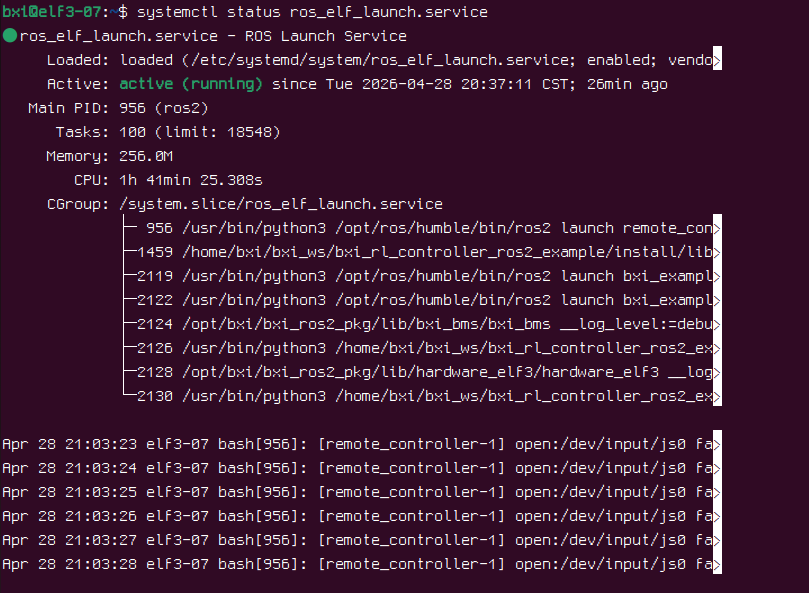
systemctl status ros_elf_launch.service

# Start the service
systemctl start ros_elf_launch.service

# Restart the service
systemctl restart ros_elf_launch.service

# Stop the service
systemctl stop ros_elf_launch.service

# Enable auto-start on boot
systemctl enable ros_elf_launch.service

# Disable auto-start on boot
systemctl disable ros_elf_launch.service
Manually Launching a Launch File or Node
Before manually debugging, stop the default service first:
systemctl stop ros_elf_launch.service
Start Simulation Program
source /opt/bxi/bxi_ros2_pkg/setup.bash
cd bxi_ws/bxi_rl_controller_ros2_example
source install/setup.bash
ros2 launch bxi_example_py_elf3 example_demo.launch.py
Start Real Robot Program (⚠️ Pay Attention to Safety)
Programs that interact with the robot's motors require root privileges:
sudo su
source /opt/bxi/bxi_ros2_pkg/setup.bash
cd /home/bxi/bxi_ws/bxi_rl_controller_ros2_example
source install/setup.bash
ros2 launch bxi_example_py_elf3 example_demo_hw.launch.py
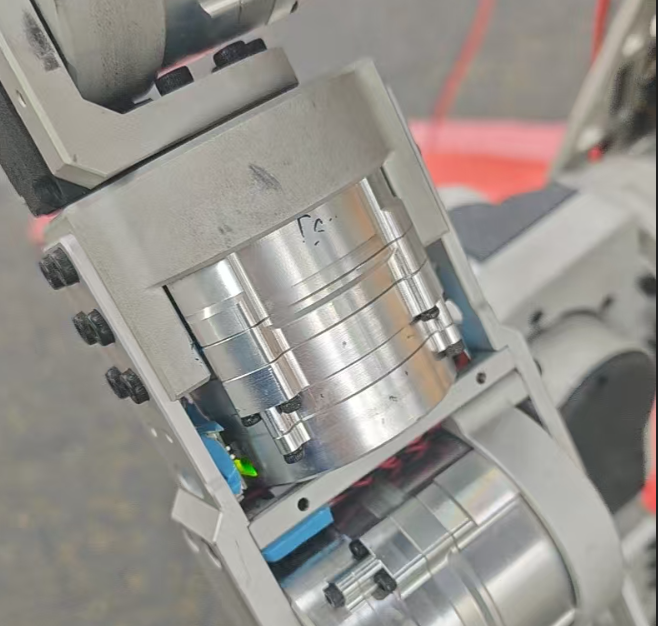
After startup, the motors will power on and all motor indicator LEDs will turn green. The robot enters a self-check routine. If the green lights remain on after approximately 6 seconds, the self-check has passed.
Start Remote Controller Program
# Real robot
sudo su
source /opt/bxi/bxi_ros2_pkg/setup.bash
cd /home/bxi/bxi_ws/bxi_rl_controller_ros2_example
source install/setup.bash
ros2 launch remote_controller remote_controller_launch.py

# Simulation
source /opt/bxi/bxi_ros2_pkg/setup.bash
cd ~/bxi_ws/bxi_rl_controller_ros2_example
source install/setup.bash
ros2 launch remote_controller remote_controller_launch.py
To start a single node, after sourcing the environment:
ros2 run <package_name> <executable_name>
Secondary Development Guide
Choosing the Right Modification Level
| Goal | Recommended Approach |
|---|---|
| Control robot movement with custom logic | Add a custom control node that publishes to /motion_commands |
| Modify the robot's motion control model | Modify bxi_example_demo.py and example_demo_hw.launch.py |
Start from Level 1: Keep the official motion control program intact and only replace the node that publishes /motion_commands. Only modify the auto-start service or its startup script if you need to change the default boot behavior.
Notes per level:
- Custom control node: Stop
ros_elf_launch.serviceor the default remote controller node before debugging to avoid multiple nodes publishing control commands simultaneously. - Modify launch files and main program: The default programs are located in
~/bxi_ws/bxi_rl_controller_ros2_example/src/bxi_example_py_elf3. After modifying, rebuild, re-source the workspace, and verify withros2 launchor by restarting the service.
Adding a Custom Controller Node
Step 1: Stop the auto-start service
systemctl stop ros_elf_launch.service
# or
killall remote_controller
Message Type
Once started, the robot subscribes to the /motion_commands topic. The message type is a custom message defined in bxi_ros2_pkg: communication/msg/MotionCommands.
std_msgs/Header header
    builtin_interfaces/Time stamp
        int32 sec
        uint32 nanosec
    string frame_id
geometry_msgs/Vector3 vel_des
    float64 x
    float64 y
    float64 z
float32 height_des
float32 yawdot_des
int32 mode
int32 btn_1  ... int32 btn_10
int32 axis_1 ... int32 axis_10
Step 2: Create a Publisher
C++ Example
1. Create a Package
# Replace my_cpp_pkg with your package name
ros2 pkg create my_cpp_pkg --build-type ament_cmake --dependencies rclcpp std_msgs
2. Write the Node
Create main.cpp under src/:
#include "rclcpp/rclcpp.hpp"
#include "std_msgs/msg/string.hpp"
#include <communication/msg/motion_commands.hpp>

using namespace std::chrono_literals;

class MotionCtrl : public rclcpp::Node
{
public:
    MotionCtrl() : Node("motion_ctrl")
    {
        publisher_ = this->create_publisher<communication::msg::MotionCommands>("/motion_commands", 20);
        timer_ = this->create_wall_timer(500ms, std::bind(&MotionCtrl::timer_callback, this));
    }

private:
    void timer_callback()
    {
        auto message = communication::msg::MotionCommands();
        message.header.stamp = this->get_clock()->now();
        message.header.frame_id = "";
        message.vel_des.x = 0.5;  // forward/backward velocity
        message.yawdot_des = 0.5; // yaw rotation velocity
        publisher_->publish(message);
    }

    rclcpp::Publisher<communication::msg::MotionCommands>::SharedPtr publisher_;
    rclcpp::TimerBase::SharedPtr timer_;
};

int main(int argc, char **argv)
{
    rclcpp::init(argc, argv);
    rclcpp::spin(std::make_shared<MotionCtrl>());
    rclcpp::shutdown();
    return 0;
}
Add the following to CMakeLists.txt:
find_package(communication REQUIRED)
add_executable(cpp_node src/main.cpp)
ament_target_dependencies(cpp_node rclcpp std_msgs communication)

install(TARGETS
  cpp_node
  DESTINATION lib/${PROJECT_NAME}
)
3. Build and Run
colcon build
source install/setup.bash
ros2 run my_cpp_pkg cpp_node
Python Example
1. Create a Package
# Replace my_py_pkg with your package name
ros2 pkg create my_py_pkg --build-type ament_python --dependencies rclpy std_msgs
2. Write the Node
Create my_py_pkg/motion_ctrl.py:
import rclpy
from rclpy.node import Node
from communication.msg import MotionCommands


class MotionCtrl(Node):
    def __init__(self):
        super().__init__('motion_ctrl')
        self.publisher_ = self.create_publisher(MotionCommands, '/motion_commands', 20)
        self.timer = self.create_timer(0.5, self.timer_callback)

    def timer_callback(self):
        message = MotionCommands()
        message.header.stamp = self.get_clock().now().to_msg()
        message.header.frame_id = ''
        message.vel_des.x = 0.5   # forward/backward velocity
        message.yawdot_des = 0.5  # yaw rotation velocity
        self.publisher_.publish(message)


def main(args=None):
    rclpy.init(args=args)
    node = MotionCtrl()
    try:
        rclpy.spin(node)
    finally:
        node.destroy_node()
        rclpy.shutdown()


if __name__ == '__main__':
    main()
Add the dependency in package.xml:
<depend>communication</depend>
Register the entry point in setup.py:
entry_points={
    'console_scripts': [
        'motion_ctrl = my_py_pkg.motion_ctrl:main',
    ],
},
3. Build and Run
colcon build
source install/setup.bash
ros2 run my_py_pkg motion_ctrl
FAQ
1. How to View Logs When the Real Robot Program Fails to Start
Official program logs are stored in /var/log/bxi_log/, sorted by time. Find the latest log file for details.
2. Checking the Auto-Start Service Status
systemctl status ros_elf_launch.service