External Dexterous Hand
This page is intended for customer-side deployment of the Revo2 dexterous hand on ELF3. It focuses on wiring, dependency installation, build, run, and acceptance checks. For SDK APIs and custom development, refer to the example repository:
- BXI Revo2 example: bxi_revo2_example
- Official hand SDK: brainco-hand-sdk
Safety
Note that only the Revo2 Advanced and Haptic versions support 58V voltage. Do not connect the basic version to the robot.
The demo moves the fingers through open, fist, pinch, single-finger motion, speed/current/PWM control, and other gestures. Make sure no body parts, cables, or fragile objects are inside the hand motion range. Do not run the full demo while the hand is holding an object.
Environment
| Item | Requirement |
|---|---|
| Robot | ELF3 with the robot hardware node running |
| Dexterous hand | Revo2 PRO && TOUCH |
| Communication | BXI controller CANFD |
| ROS version | ROS 2 Humble |
| Example package | bxi_revo2_example |
| Python SDK | bc-stark-sdk==1.5.1 |
The example package communicates with the BXI CANFD hardware node through communication/msg/CANFDPacket, so the bxi_ros2_pkg environment must be sourced first.
Wiring
With the default wiring, no source-code changes are required:
| Hand | BXI controller port | Default ID | Protocol | master_id |
|---|---|---|---|---|
| Left hand | CAN5 | 126 / 0x7E | CANFD | 1 |
| Right hand | CAN6 | 127 / 0x7F | CANFD | 1 |
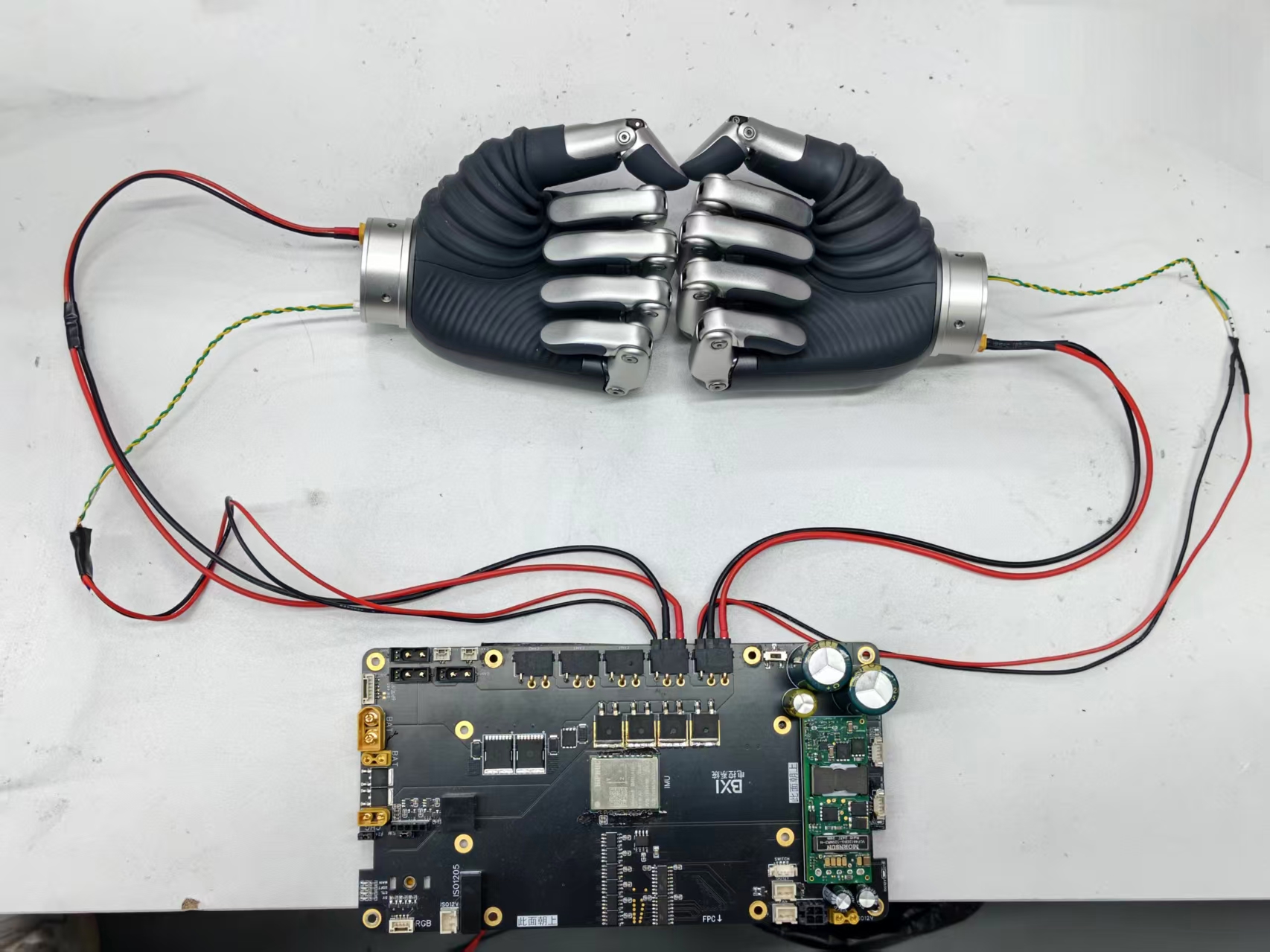
After wiring, start the robot normally. When the hardware node starts successfully, the Revo2 hand usually opens automatically. Use this as the first hardware-link check.
Quick Deployment
1. Get The Example Package
Run the following on the robot controller or a ROS 2 host:
cd ~/bxi_ws
git clone https://github.com/konodoki/bxi_revo2_example.git
If GitHub is unavailable on site, download the repository in advance and copy it to ~/bxi_ws/bxi_revo2_example.
2. Download The C++ SDK Files
The C++ demo requires the official SDK shared library and headers before build.
cd ~/bxi_ws/bxi_revo2_example
./download-lib.sh
The script creates:
dist/include/dist/shared/linux/libbc_stark_sdk.soVERSION
3. Install The Python SDK
Install the pinned SDK version before running the Python demo:
pip install bc-stark-sdk==1.5.1 --index-url https://pypi.org/simple/
4. Build The Package
cd ~/bxi_ws/bxi_revo2_example
source /opt/ros/humble/setup.bash
source /opt/bxi/bxi_ros2_pkg/setup.bash
colcon build
source install/setup.bash
Tip
If the communication package is built in another workspace, source that workspace before running colcon build.
Run And Validate
1. Set The CANFD ROS 2 Environment
The hand demo communicates with the robot hardware node through /canfd_packet/rx and /canfd_packet/tx. Because the hardware node normally runs as root, set the same ROS 2 Domain and CycloneDDS network configuration in a root shell, and run the demo from that shell:
sudo su
export ROS_DOMAIN_ID=ROBOT_DOMAIN_ID
export RMW_IMPLEMENTATION=rmw_cyclonedds_cpp
export ROS_LOCALHOST_ONLY=0
export CYCLONEDDS_URI='<CycloneDDS><Domain Id="any"><General><Interfaces><NetworkInterface name="lo" multicast="true"/></Interfaces><AllowMulticast>true</AllowMulticast></General></Domain></CycloneDDS>'
Replace ROBOT_DOMAIN_ID with the numeric Domain ID used by the robot. Do not set the variables only in a normal-user shell and then switch to root; sudo su does not reliably preserve the ROS environment.
2. Start The Robot Hardware Node
Start ELF3 using the normal robot startup flow. See Motion Control Development Guide if needed.
Check that the CANFD topics exist:
source /opt/ros/humble/setup.bash
source /opt/bxi/bxi_ros2_pkg/setup.bash
ros2 topic list | grep canfd_packet
Expected topics:
/canfd_packet/rx
/canfd_packet/tx
3. Run The Demo
Run the C++ demo:
cd ~/bxi_ws/bxi_revo2_example
source /opt/ros/humble/setup.bash
source /opt/bxi/bxi_ros2_pkg/setup.bash
source install/setup.bash
ros2 run bxi_revo2_example bxi_revo2_example
Or run the Python demo:
cd ~/bxi_ws/bxi_revo2_example
source /opt/ros/humble/setup.bash
source /opt/bxi/bxi_ros2_pkg/setup.bash
source install/setup.bash
ros2 run bxi_revo2_example bxi_revo2_example.py
3. Acceptance Check
The terminal should print device information, finger positions, speeds, currents, and configuration values. The hand will run:
- Basic position control: fist, open hand, single-finger motion;
- Speed, current, and PWM control;
- Revo2 advanced control: unit mode, position with time, position with speed, multi-finger motion;
- Built-in gestures: Open, Fist, Pinch, Point, and others;
- Device information and parameter queries.
The default demo runs the left hand first, then the right hand. If both hands complete these actions without continuous errors, the basic deployment is complete.
Change The Default Bus Or ID
If the site wiring or hand ID differs from the default configuration, update the bus and ID in the example source.
Python example:
~/bxi_ws/bxi_revo2_example/src/bxi_revo2_example.py
Default configuration:
left_ctx = await init_bxipci_device(5, 126, master_id=1, is_canfd=True, ...)
right_ctx = await init_bxipci_device(6, 127, master_id=1, is_canfd=True, ...)
C++ example:
~/bxi_ws/bxi_revo2_example/src/bxi_revo2_example.cpp
Default configuration:
init_bxipci_device(&left_ctx_, 5, 126, true);
init_bxipci_device(&right_ctx_, 6, 127, true);
Rebuild after changing the source:
cd ~/bxi_ws/bxi_revo2_example
colcon build
source install/setup.bash
Troubleshooting
Missing stark-sdk.h Or libbc_stark_sdk.so
The C++ SDK files have not been downloaded. Run:
cd ~/bxi_ws/bxi_revo2_example
./download-lib.sh
Then rebuild the package.
No module named bc_stark_sdk
The Python SDK is missing or installed into the wrong Python environment. Run:
pip install bc-stark-sdk==1.5.1 --index-url https://pypi.org/simple/
communication.msg.CANFDPacket not found
The BXI ROS 2 message package environment has not been sourced:
source /opt/bxi/bxi_ros2_pkg/setup.bash
source ~/bxi_ws/bxi_revo2_example/install/setup.bash
No Response Or Read Timeout
Check the following:
- Left hand is connected to CAN5 and uses ID 126;
- Right hand is connected to CAN6 and uses ID 127;
- The robot hardware node is running and
/canfd_packet/rxplus/canfd_packet/txexist; - Cabling and power are normal;
- No other process is controlling the same hand at the same time.
- If it is a factory-installed hardware node, please check if ROS_DOMAIN_ID is consistent.
Development Entry
Customer deployment usually does not require changes to the low-level CAN bridge. To control the hand from a custom ROS 2 node, see “Use In Your Own ROS 2 Node class” in the example repository README: